


 SPARK Website
The Paperless Revolution: The Ultimate Guide to Document Scanners in 2026
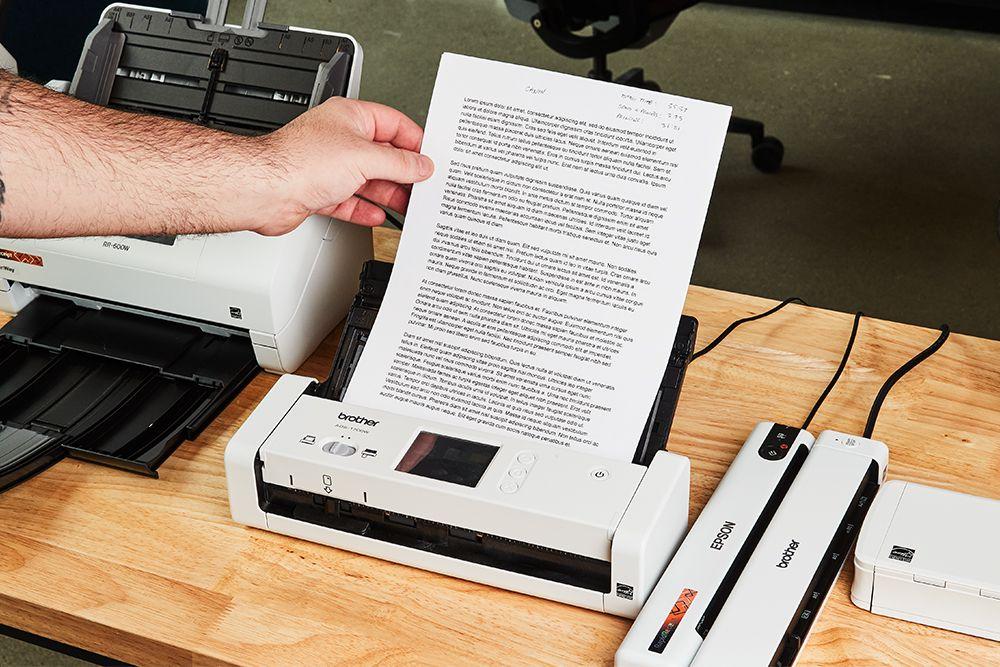
In an era where digital transformation is no longer a buzzword but a survival requirement for businesses, the humble document scanner has evolved into a high-tech gateway. We live in a hybrid world: while our communication is digital, our legacy—contracts, blueprints, historical archives, and medical records—is often still physical.
The document scanner is the bridge. It is the device that transforms static, vulnerable paper into dynamic, searchable, and secure digital assets. Whether you are a solo entrepreneur organizing your first home office or an IT director managing a multi-national firm’s archives, understanding the nuances of modern scanning technology is essential.
1. What is a Document Scanner? Beyond the Flatbed
To the casual user, a scanner is that glass plate on top of a home printer. But for professional environments, a true document scanner is a specialized piece of hardware designed for speed, volume, and precision.
While a flatbed scanner is great for a single delicate photo, a professional ADF (Automatic Document Feeder) scanner is built to ingest stacks of paper at speeds exceeding 60 to 100 pages per minute. In 2026, these machines don't just "take a picture"; they use sophisticated image processing to remove wrinkles, straighten skewed pages, and even "drop out" specific colors to make text more readable for computers.
2. Choosing Your Scanner: The Core Categories
Selecting the right hardware depends entirely on your "Paper Velocity"—how much paper moves through your office daily.
Portable & Mobile Scanners
Compact enough to fit in a laptop bag, these are powered via USB. They are the go-to choice for real estate agents, traveling auditors, and digital nomads who need to digitize receipts or signed contracts on the spot.
Desktop Workgroup Scanners
The workhorses of the modern office. These devices sit on a desk and can handle 3,000 to 10,000 scans per day. They are designed for reliability, featuring "ultrasonic double-feed detection" to ensure that if two pages stick together, the machine stops instantly to prevent a missed scan.
Production Scanners
These are the heavyweights found in back-office mailrooms and dedicated scanning bureaus. They are floor-standing units capable of handling 100,000+ scans a day, often featuring vacuum-feed technology to handle varied paper weights, from onion-skin thinness to heavy cardstock.
3. The Science of the Scan: Sensors and Resolution
The quality of your digital file is determined by two main factors: the sensor type and the resolution.
-
CIS (Contact Image Sensor): Found in most modern, sleek scanners. CIS sensors use LEDs to illuminate the document. They are energy-efficient and allow for thinner devices, though they have a shallow depth of field.
-
CCD (Charge-Coupled Device): Common in high-end production and photo scanners. These use a lens system similar to a camera, providing superior color depth and the ability to scan items that aren't perfectly flat (like the spine of a book).
DPI: How Much is Enough?
-
200 DPI: The standard for basic document archiving; keeps file sizes small.
-
300 DPI: The "Sweet Spot." This is the minimum required for high-accuracy OCR (Optical Character Recognition).
-
600 DPI+: Reserved for fine-art reproduction or documents with extremely small, technical footnotes.
4. Intelligent Features: Why 2026 Hardware is Different
Modern document scanners are "smarter" than their predecessors. They no longer require a human to sit and watch every page.
-
Automatic Image Enhancement: The scanner automatically detects if a page is in color or black and white, removes blank pages, and adjusts the brightness so that a faint pencil mark is as clear as black ink.
-
Sonic Paper Protection: Advanced sensors "listen" to the sound of the paper moving. If they hear the crinkle of a staple or a jam, the motor shuts down in milliseconds to save the original document from damage.
-
Direct-to-Cloud Scanning: High-end scanners now feature built-in Wi-Fi and touchscreens, allowing you to scan directly to SharePoint, Google Drive, or your ERP system without ever touching a PC.
5. Building a Secure Digital Pipeline with Tecisoft
A document scanner is the entry point, but it is only as effective as the network and hardware infrastructure supporting it. Digitizing 10,000 pages creates a massive influx of data that must be moved, stored, and backed up securely. If your network is slow or your storage is unreliable, your scanning project will become a bottleneck.
For organizations looking to build a high-performance digital archive, Tecisoft provides a comprehensive suite of IT hardware and technical solutions. Whether you are sourcing the high-speed networking gear required to move massive batches of images or the professional-grade peripherals that integrate your scanners with your central servers, having a reliable hardware partner is essential. By ensuring your underlying infrastructure is as modern as your scanner, you create a seamless "paper-to-cloud" pipeline that is both fast and secure.
6. OCR: Turning Pictures into Knowledge
The true power of a document scanner isn't the image it creates; it's the data it extracts. OCR (Optical Character Recognition) software takes the "picture" of the page and identifies the characters.
In 2026, AI-integrated OCR can do more than just read text; it can understand Context.
-
Invoice Processing: The system automatically finds the "Total Due," the "Invoice Number," and the "Date," and inputs them directly into your accounting software.
-
Searchable PDFs: You can search your entire digital archive for a single keyword (e.g., "Contract 2022") and find the exact page in seconds, rather than digging through physical boxes.
7. Compliance and Security: Protecting the Data
In the era of GDPR and strict data privacy laws, your scanning workflow must be secure.
-
Encrypted PDF Output: Ensuring that the file is password-protected the moment it is created.
-
Secure Deletion: Professional scanners have "volatile memory," meaning that once the scan is sent to the computer, no image data remains on the hardware for a hacker to find.
-
Digital Signatures: Attaching a digital "stamp" to the scan to prove that the document hasn't been altered since the day it was digitized.
8. Ergonomics and Maintenance
To keep a document scanner running for years, maintenance is non-negotiable.
-
Roller Replacement: The rubber rollers that pull the paper eventually wear down. Most professional scanners have a "life counter" that tells you exactly when it's time to swap them out.
-
Glass Cleaning: A single speck of dust on the scanning glass will result in a vertical line across every single page. Regular cleaning with a lint-free cloth and specialized cleaner is vital.
-
Positioning: Place the scanner in a low-dust environment. Excessive dust from an open warehouse can clog sensors and lead to frequent jams.
9. Specialized Scanning: Books and Large Formats
Sometimes, an ADF scanner isn't enough.
-
Overhead Scanners: These look like desk lamps. They scan from above, allowing you to turn the pages of a fragile book without damaging the binding.
-
Large Format Scanners: Essential for architects and engineers. These can ingest blueprints and maps up to 40 inches wide, preserving the intricate details of a technical drawing.
10. Conclusion: The ROI of Going Digital
A document scanner is an investment in Time and Space. By digitizing your records, you reclaim physical square footage previously occupied by filing cabinets. More importantly, you reclaim the hours spent searching for lost documents.
When you pair high-performance scanning hardware with a robust IT infrastructure, you transform your office from a static environment into a high-speed digital engine. In the modern world, the most successful companies are the ones that can access their information the fastest. The document scanner is the first step in that journey. Don't just store your paper—unlock the data hidden within it.

 English