


 SPARK Website
Why Real-Time Alerts Are Essential in Website Monitoring (Even for Small Sites)
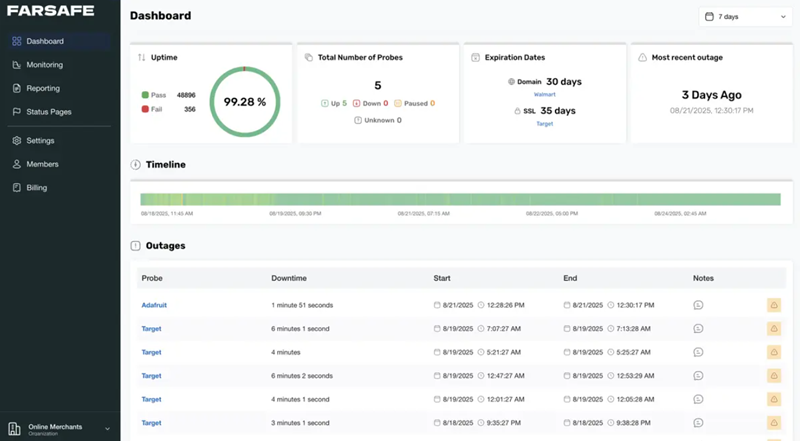
Maintaining a consistent online presence is no longer optional. Even a brief period where a website is inaccessible can drive away visitors and erode the trust you have built with your audience. While large corporations have massive budgets for technical oversight, small business owners and independent bloggers often assume that manual checks are enough.
Modern free web page monitoring has changed this dynamic by providing professional grade tracking to everyone. The true value of these tools lies in their ability to send instant notifications. Without these alerts, monitoring is simply a record of what went wrong after the damage is done. This guide explores how immediate notifications protect your SEO and why they are the foundation of a reliable website strategy.
Understanding Real-Time Alerts in Website Monitoring
At its core, a real-time alert is an automated broadcast sent the moment your site fails a health check. These systems function by pinging your server at regular intervals. If the server fails to respond or the page takes too long to load, the system triggers a notification.
Instead of finding out your site is broken from a frustrated customer or a drop in your analytics, you become the first to know. This allows you to resolve the technical glitch before the majority of your traffic even notices a problem.
Essential Alert Types for Site Owners
Modern systems go beyond simple "up or down" checks. Most comprehensive tools now provide:
- Uptime alerts to catch total server failures.
- Performance alerts for slow loading speeds.
- SSL alerts to prevent certificate expiration.
- Security notifications for unexpected code changes.
Why Small Websites Need Immediate Detection
Small sites often operate without a dedicated technical team. This makes them more vulnerable to long periods of undetected downtime. Instant notifications act as a virtual assistant that watches your site every second of the day.
Visitors expect a seamless experience. If a site is slow or broken, they will likely return to search results and click on a competitor. By using alerts to maintain a high standard of performance, you protect your revenue and keep your brand's reputation intact.
The SEO Impact of Website Downtime
Search engines like Google prioritize user experience. Their crawlers frequently visit your site to index new content and verify its stability. If a crawler encounters a "500 Internal Server Error" or a "404 Not Found" multiple times, it may signal that your site is unreliable. This can lead to a temporary or even permanent drop in your search rankings.
Reliable monitoring ensures your site remains accessible to these crawlers. Since alerts help you fix issues faster, you minimize the window of time where a search engine might find your site offline. This stability is a key factor in maintaining long term SEO growth.
Strengthening Security with SSL Monitoring
Security is a primary concern for both users and search engines. An SSL certificate ensures that data transmitted between the user and the server is encrypted. However, these certificates expire. When they do, browsers display a prominent "Your connection is not private" warning which effectively blocks traffic.
Manual tracking of these dates is prone to human error. Utilizing dedicated SSL Monitoring Tools is a much safer approach. You can find detailed strategies on how to automate this process in this guide on SSL Monitoring Tools, which covers how to stay ahead of expiration dates.
Trusted organizations like Mozilla and the Let’s Encrypt project emphasize that HTTPS is mandatory for a modern web. Automated monitoring ensures you never miss a renewal deadline.
Critical Features in Free Web Page Monitoring Tools
When selecting a tool, look for a platform that offers multiple notification channels. While email is standard, having options for SMS or push notifications ensures you see the message regardless of where you are.
Performance tracking is another vital feature. It is not enough for a site to be "on." It must also be fast. A tool that monitors server response times helps you identify bottlenecks before they turn into full scale crashes. Many top tier providers also offer public status pages, which allow you to be transparent with your users during scheduled maintenance.
Improving Efficiency Through Automation
Relying on manual checks is an inefficient use of time. It is impossible for a human to check a website every minute of every day. Automation removes this burden. By setting up a system for free web page monitoring at farsafe.com, you can focus on growing your business while the software handles the technical surveillance.
This level of automation also improves team coordination. Alerts can be sent to multiple people simultaneously, ensuring that whoever is available can jump in and fix the issue immediately.
Setting Up Your Alert System
The first step is choosing a platform that fits your needs. Many services provide robust free tiers that include the essential features discussed here. Once you have selected a tool, you should:
- Set your check frequency (every 1 to 5 minutes is ideal).
- Define your thresholds for what counts as "slow."
- Add multiple contact methods for alerts.
- Run a test to confirm the notifications are arriving in your inbox.
Final Thoughts
Real time alerts move website management from a reactive state to a proactive one. For small websites, this is the most cost-effective way to ensure professional levels of reliability. By using these tools, you protect your SEO, keep your users happy, and ensure your security certificates never lapse.
Common Questions About Website Monitoring
How does monitoring help with SEO?
It prevents long periods of downtime that could cause search engine crawlers to de-index your pages or lower your ranking due to perceived instability.
Is SSL monitoring really necessary?
Yes. An expired SSL certificate can cause more damage to your reputation than a few minutes of downtime because it suggests your site is not secure.
What is the best way to receive alerts?
A combination of email for records and SMS or push notifications for urgent issues is usually the most effective setup.

 English